Active
Service Pages with iNetGrowX
This section presents an example
of an Active Service Page (ASP) that uses iNetGrowX to compose web pages. The ASP uses the member functions of
iNetGrowX. For more information about
the member functions, please see the section “iNetGrowX.”
The following example is written
using the Visual Basic Script (VBScript).
The ASP page generates a list of all inputs, outputs, variables, and
parameters. The parameter values
are written inside text boxes, so that you may change their values. The page retrieves all information
(names and values) from the controller.
The controller IP address is the default “192.168.0.65” assumed to be on
a local private network.
You may view the
current state of the controller at the iNetGrow server or see a screen shot of the page generated by this ASP.
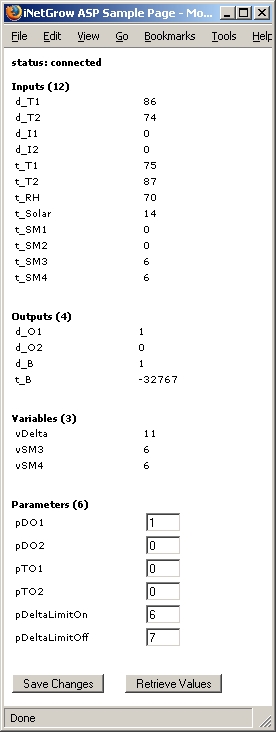
Note that this page simply
enumerates all inputs, outputs, variables, and parameters. In this respect, it works with any
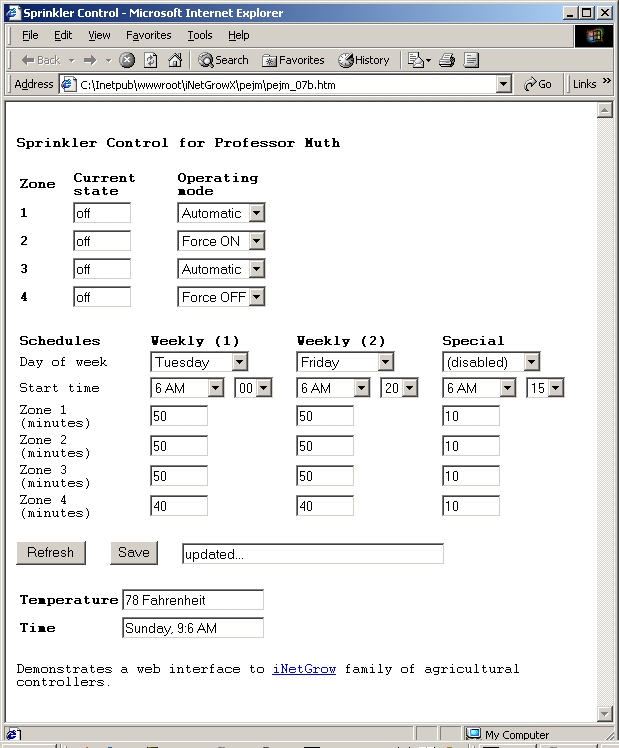
controller. Often, a customized
page that reflects the specific aspects of a given application is desired. Customization may include descriptive
titles and prompts as well as specific user input fields, such as radio buttons
or drop-down lists. Here is a screen shot of such a page and its source.
<%
option explicit %>
<html>
<head>
<title>iNetGrow
ASP Sample Page</title>
<style>
td{width:150px;
font-family:Verdana; font-size:12px;}
body{font-family:Verdana;
font-size:12px;}
</style>
</head>
<body
bgcolor="#ffffff">
<%
Dim oGrow,
n, nNumInputs, nNumOutputs, nNumVariables, nNumParameters
Dim txtName
set oGrow
= Server.CreateObject("INETGROWX.iNetGrowXCtrl.1")
n =
oGrow.Connect("192.168.0.65" , 8448)
if n=0 then
Response.Write "<b>status: not connected!</b>" :
Response.End
if n=1 then
Response.Write "<b>status:
connected</b><br><br>"
nNumInputs
= oGrow.GetNumInputs(1)
nNumOutputs
= oGrow.GetNumOutputs(0)
nNumVariables
= oGrow.GetNumVariables(0)
nNumParameters
= oGrow.GetNumParameters(0)
if
Request.Form("PbUpdate") = "Save Changes" then
for
n=1 to nNumParameters
call
oGrow.SetParameterValue(n-1, Request.Form("txtP" & n))
next
end if
%>
<form
method="POST" action="iNetGrow.asp">
<b>Inputs
(<% = nNumInputs %>)</b><br>
<table>
<%
for n=1 to
nNumInputs
Response.Write("<tr><td>"&
oGrow.GetInputName(n-1) & "</td><td>" &
oGrow.GetInputValue(n-1) & "</td></tr>")
next
%>
</table>
<br><br>
<b>Outputs
(<% =nNumOutputs %>)</b><br>
<table>
<%
for n=1 to
nNumOutputs
Response.Write("<tr><td>"
& oGrow.GetOutputName(n-1) & "</td><td>" &
oGrow.GetOutputValue(n-1) & "</td></tr>")
next
%>
</table>
<br><br>
<b>Variables
(<% = nNumVariables %>)</b><br>
<table>
<%
for n=1 to
nNumVariables
Response.Write("<tr><td>"
& oGrow.GetVariableName(n-1) & "</td><td>" &
oGrow.GetVariableValue(n-1) & "</td></tr>")
next
%>
</table>
<br><br>
<b>Parameters
(<% =nNumParameters %>)</b><br>
<table>
<%
for n=1 to
nNumParameters
txtName =
"txtP" & n
Response.Write("<tr><td>"
& oGrow.GetParameterName(n-1) & "</td><td><input
type=""text"" size=""3""
name=""" & txtName & """ value=""" &
oGrow.GetParameterValue(n-1) &
"""></td></tr>")
next
%>
</table>
<br><br>
<input
type="submit" name="PbUpdate" value="Save
Changes" >
<input
type="submit" name="PbRefresh" value="Retrieve
Values" >
</form>
</body>
</html>
<%
Set oGrow =
Nothing
%>
Also see the sections “iNetGrowX” and
“Integrating with Web Services.”

© Rigel Corporation iNetGrow 2003-2006. All rights reserved.