

LAN Configurations
The iNetGrow controllers use Internet protocols to communicate with the PCs. There are several ways you can connect your PC to one or more iNetGrow controllers. The following summarizes the main types of connections. These are referred to as “network architecture” or sometimes “network topology.”
Simple Direct Connection
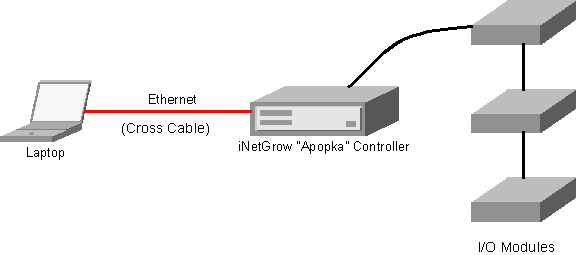
An iNetGrow controller can be directly connected to a PC using a crossover Ethernet cable.
(Click on pictures to enlarge.)
Wireless Direct Connection
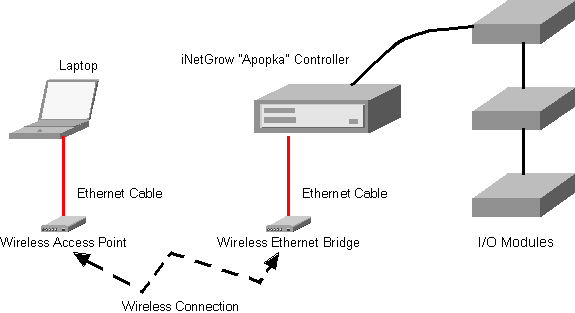
Here, the crossover Ethernet cable between the PC and the controller is replaced by a wireless connection.
Ethernet Switches
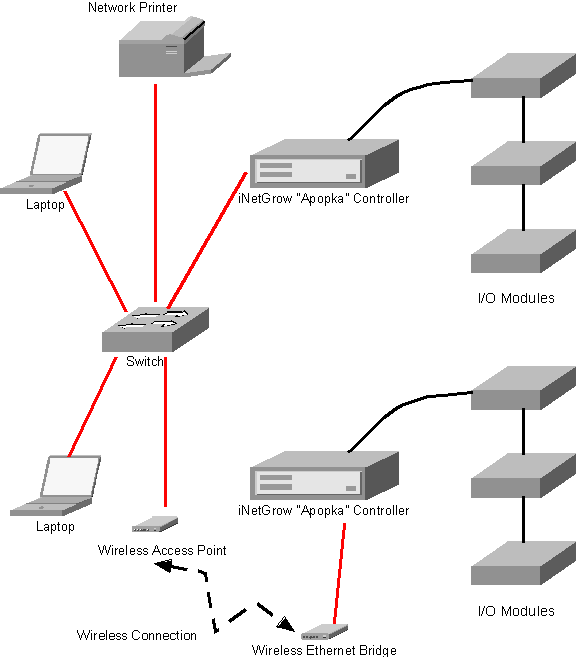
An Ethernet switch allows you to connect more than two devices to the network. For example, if you want to connect your PC to two or more iNetGrow controllers, then a direct connection would not suffice. A switch is another name for a smart Ethernet hub.
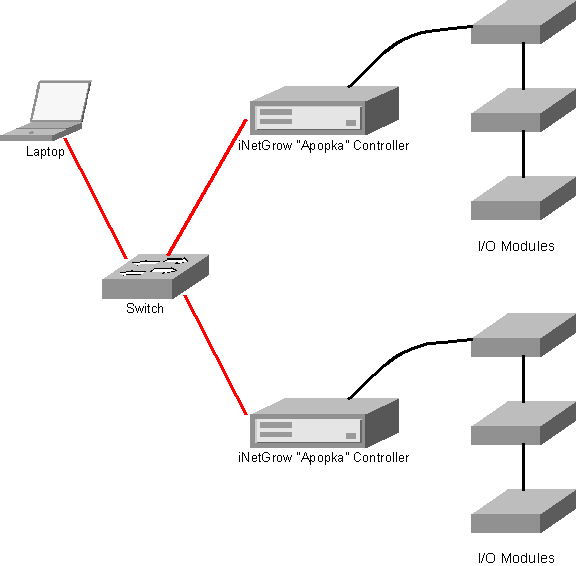
Switches may have many physical ports, or sockets, to which you may connect Ethernet cables. Once you use a switch, you may connect other things to your network. For instance, you may connect other PCs, Wireless Internet Bridges, network printers, or modems.
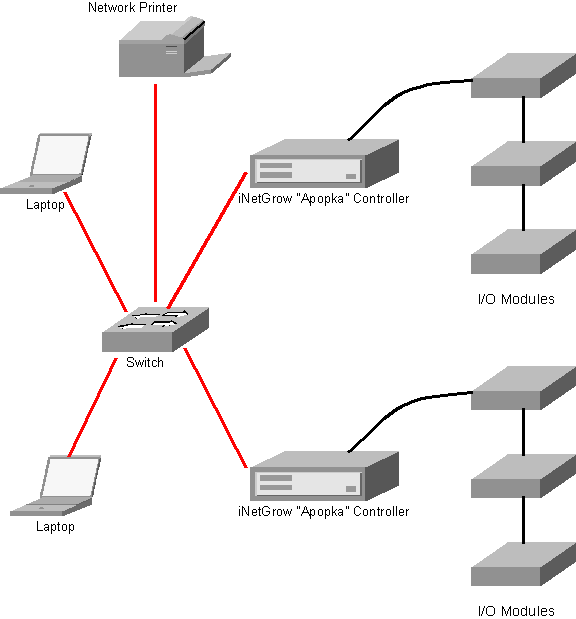
You may also use a wireless access point to reach one or more wireless devices.
Internet Access and Access from the Internet
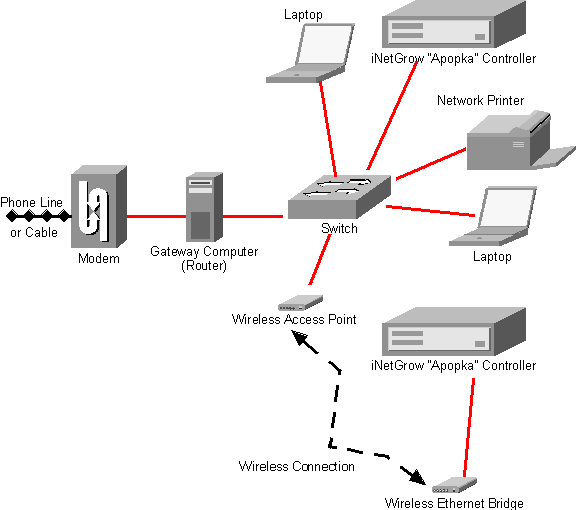
The LAN built around the Ethernet switch allows connected PCs to communicate with the iNetGrow controllers. However, as seen in the above diagrams, these LANs are isolated from the outside world. If, for instance, you wanted to view the I/O on a module from a distant PC over the Internet, you would need to somehow connect your LAN to the Internet. Large companies may have fast links to the Internet (e.g. a T1 line). However, most small businesses and homes use a DSL modem or cable modem to connect to the Internet.
Tasks of the Gateway/Router
The modem is connected to a gateway computer that acts as a router. The modem connection is associated with an IP address, which is unique among all other devices on the Internet. Similarly, each device on the LAN also has an IP address. However, the LAN IP addresses are “private,” that is, meaningful only to the local network. When a device on the LAN wants to send a message to a remote node, it cannot use this private address to identify itself. It sends the message to the gateway (computer). The gateway then removes any reference to the requesting node and transmits the message, identifying itself by the IP address provided by the modem connection. So to the outside world, all requests seem to come from the gateway. Similarly, all responses go to the gateway. Now the task is reversed. The gateway must “remember” which device made the request and direct the response to that device. So to a local node, it seems that a message has been sent to a remote node on the Internet, and a response has been received. The task of channeling the responses to the requesting local devices is the “routing” activity of the gateway. Here, let us make two important observations: First, the router must be a “smart” device, such as a PC or an embedded PC. Simply “splicing” Ethernet cables and connecting them to the Internet will not work. Secondly, the router cannot forward an unsolicited message that it receives from the outside world. After all, how could the router decide which local device is the intended destination. The latter point is important if you want to directly reach an iNetGrow controller from the Internet. Routers use “Port Forwarding” to resolve this issue.
Port Forwarding
The router may be programmed to channel unsolicited messages according to the message port number. Here, the term “port number” may be somewhat confusing. It does not refer to a physical connection. Rather, it is a logical number that accompanies an IP address. The iNetGrow controllers use port 8448. The router may be programmed to forward all messages that come to port 8448 to the private IP address associated with the iNetGrow computer.
Routers and Wireless Routers
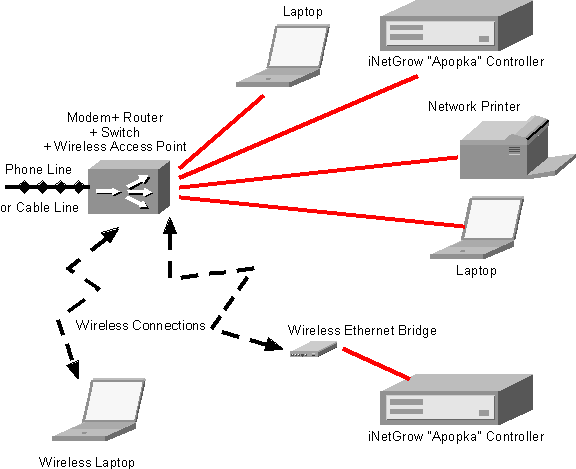
The popularity of home networks has introduced many low-cost devices that combine the functionality of networking elements. Most importantly, many low-cost routers are now available that can service the modem and perform tasks such as port forwarding. Moreover, these routers may contain a switch, so that several devices can be connected to it directly. Some routers also include a wireless access point, so that not only wired devices, but also wireless devices may access the outside connection.The
popularity of home networks has introduced many low-cost devices that combine
the functionality of networking elements. Most importantly, many low-cost routers are now available that can service the modem and perform tasks such as port forwarding. Moreover, these routers may contain a switch, so that several devices can be connected to it directly. Some routers also include a wireless access point, so that not only wired devices, but also wireless devices may access the outside connection.
© 2003-2006 Rigel Corporation, all rights reserved.